
Aarhus with Kusama
Mar 13, 2026 · live
Aarhus with Kusama is live.
The piece is immersive and calm. The build process was less calm, mostly in the traditional way: one fix creates two new mysteries, and suddenly you have opinions about terrain normals at midnight.
Live piece
https://www.unusable.ai/aarhus-with-kusama/
Best on a large screen or projection, with enough time to stay in it.
What happened before the first line of project code
The starting point was not “let’s make a Kusama-like city.” It was a research detour into Google Earth API offerings and a simpler question:
What would my city look like if I took 3D spatial information for buildings and trees and transferred it into a volumetric dot matrix?
When I opened the Codex project, the first request was practical:
- find public, no-pay APIs and open sources for spatial city data
- identify cities where this data is actually usable
Copenhagen and Aarhus came up as good candidates. I chose Aarhus because I like Aarhus, and because AROS is there, which felt like the right spiritual pressure to put on the project.
(There is also a separate Copenhagen piece nearly ready, focused on fluid dynamics through the street network, so this was not a one-city accident.)
What the piece does
A real Aarhus dataset is remapped into a porous 3D dot field and played as a synchronized walk.
Anyone joining the piece is placed at the same point on the route at the same moment in time. Shared timeline, personal perception.
Colors drift in grouped pulse behavior. Audio stays quiet and serene: soft resonant events with space, not loud impact theater.
Route and scale
Current ballpark numbers:
- Build sprint span: March 12 to March 13, 2026.
- Effective development window: about 26 hours including sleep.
- Prompt count in the main thread: about 143.
- Loop length: about 3,323 meters.
- Loop duration: about 55 minutes.
- Unique static dots over one full loop: about 3.26M to 3.40M.
- Practical shorthand: about 3.3M static dots.
From current files (stroll.adjusted.json + aarhus-overpass-detail-snapshot.corridor.model.json):
- Building dots: roughly 2.8M to 2.9M.
- Ground dots: roughly 0.48M to 0.51M.
Transient particle dots are excluded from those totals.
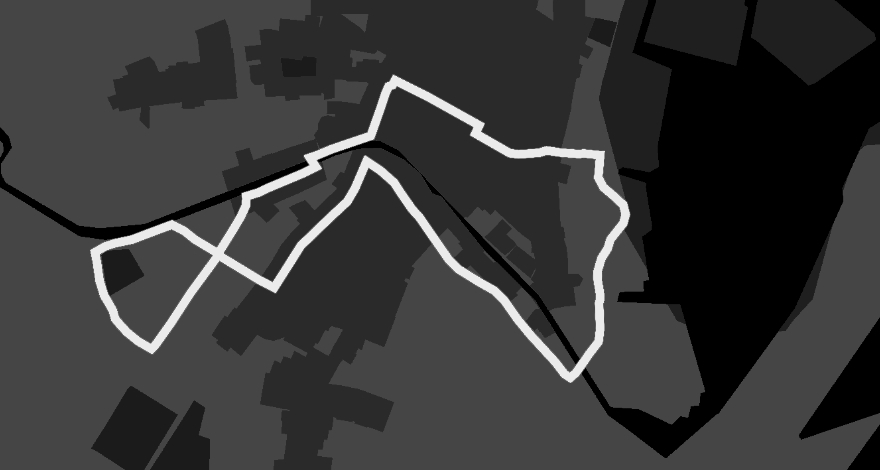
The image below shows the actual walk route used by the simulation. The system loops this route continuously on the shared clock.
Build log from “blank project” to live piece
Rendering and camera stability
First passes were mostly visibility and framing work:
- camera aimed wrong
- poor depth readability
- stride/framing combinations that made the city feel dead
The project became usable once the camera behaved like a person moving through streets, not like a floating scanner:
- eye height around 1.8 m
- street-facing orientation
- distance falloff tuned for legibility
- heading/movement slew to avoid robotic corner snaps
- sway reduced when it became performative
Deterministic sync
Global sync was non-negotiable. People joining from different places should still share route position over time.
This required repeated cleanup around epoch math, loop boundaries, and reload consistency. Very glamorous work if you are emotionally attached to timestamps.
Sound and impact behavior
Impact behavior took several rewrites.
The target was not noise density. The target was quiet resonance with enough motion to feel alive:
- modal tones in a constrained scale with slight detune
- collision-driven waves through the dot field
- ricochet with drag/restitution limits
- terrain-normal bounce direction so slope affects motion
The final behavior sits in a softer register: present, textured, restrained.
Kusama pulse logic
Grouped blinking plus slow palette drift gave the piece its character.
Main stability work:
- prevent accidental global dimming
- avoid over-sync between groups
- keep local variation visible over long viewing periods
Performance passes
A lot of “boring but decisive” work happened late:
- corridor culling around the route
- tile/column indexing
- hybrid GPU pass support
- startup caching and less off-path processing
Without these passes, the piece remained a nice idea and a slightly aggressive fan test.
Debugging pattern that kept paying off
The most useful troubleshooting prompt in this project was:
Please explain how this process works in simple terms, step by step.When the system drifted into weird behavior, this prompt forced a clean pipeline explanation and made it easier to point the coding agent to the likely fault line. We used this repeatedly on bugs that did not yield to quick fixes.
Things that were cut or toned down
- path reroute/evasion behavior (interesting idea, bad for deterministic sync)
- wave envelopes that were too busy
- color behavior that flattened group identity
- physically plausible bounce variants that sounded worse than the stylized version
Iteration speed was useful. Deleting things quickly was more useful.
Closing note
The end result is an extremely uninteractive, immersive, over-engineered piece of art, and I am extremely proud of it.
It would sit naturally in any museum context showing contemporary immersive work.