
Filtered Regret Sequencer
Feb 26, 2026 · prototype
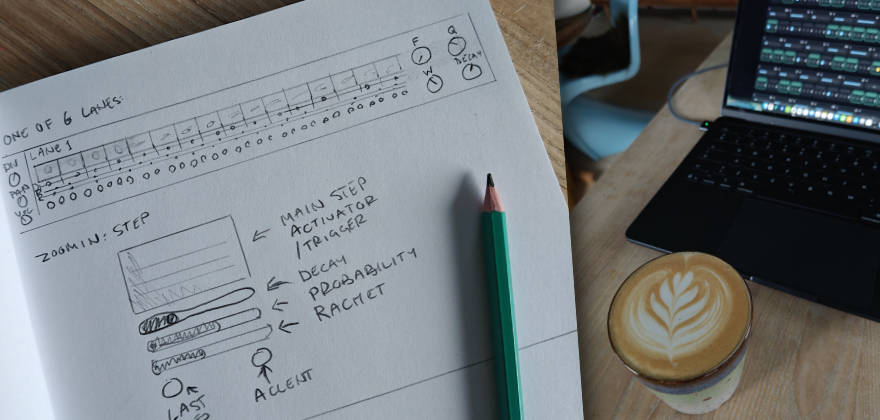
Filtered Regret Sequencer is a single‑file browser “drum machine” built from one shared white‑noise source, sliced into six band‑pass lanes, and sequenced with a 16‑step x0x grid.
It exists for one reason: to see if ChatGPT can take a sketch + a dense spec and produce an interface that matches intent, not just functionality.
Spoiler: the DSP side behaved. The UI side did what UIs always do: quietly ignored my wishes.
Try it
- Demo: https://www.unusable.ai/filtered-regret-sequencer/
- GitHub: https://github.com/unusable-ai/Filtered-Regret-Sequencer/
The experiment
This was primarily a test of “sketch → working interface” transfer using ChatGPT (GPT‑5.2 Thinking, extended thinking).
My usual approach is to avoid over-restricting the model. I tend to get “more than I asked for”, and sometimes those extras are genuinely good. Here it also means you get a realistic look at what happens when you let the model make assumptions.
The spec deliberately included multiple conflicting pressures:
- Minimal labels (LLMs really want to explain everything)
- Custom UI interactions (LLMs really want standard inputs)
- Single‑file constraint (UI + DSP + sequencing + MIDI in one document)
- Tight responsive layout requirements
Prompt 1 (included exactly as used)
You are a DSP wizard and we are looking into a single file - html - web application/dsp experiment. This time it is kind of a drum-machine using just filtered white noise with possibility of midisync.

 One White Noise source used by all lanes.
 Six lanes: Bandpass filter with freq, q/res, width for each (I want a rather steep slope on the filter 48db ish) An Decay envelope controlling amplitude Triggered by a 16 x0x seq - Rectangle shape lightening up when activated - blinking when “hit”. Each step has on/off (see the last sentence), small slider for decay (100% default, shortens), small slider for probability (def 100%), small slider for rachet (def 1 max 4), small button/led that makes it the last step (goto 1 on next clock (based on set division)), small led/button accent Each lane has a division setting (16th/8th/etc) Level stting Pan setting Master: The main controls are:
 tempo (20 bpm - 300 bpm)
 volume
 accent (affecting amount of amplitude boost on all lanes)
 delay - dry/wet - tempo (based on divisions (straight/triplets/dotted)) - feedback (bandpass filtered softclipped feedback)
 Start button Stop button Note: All lanes reset to zero on stop. Last setting: Midi sync setting - master/slave

 Interface:
 I have attached a hand-drawn sketch of a lane - as well as a detail view of a single step.
When scaled down on smaller screen the lane should break into 2 and 4 lines (four steps need to fit in width on a mobilescreen).
To save space controls should have minimal labels in the interface - a help button should turn on and off an overlay with full labels for each control.

 Before you start - please ask me any questions about unclear statements or requests in my prompt.
Iteration 1 (generation time: 12m 03s)
- Result: a working noise-based drum machine, surprisingly close to the technical spec.
- UI: started “reasonable”, but also immediately drifted toward standard widgets and explanatory text.
Prompt 2 (revision request, included as used)
Can you revise it with a minor technical change:
Add a randomization button, randomizing all lane parameters.
Drop per step decay.

And the bigger change:
Interface revision. Instead of using standard UI components, make it custom. The zoomed in view in the sketch is what should be available for each step on any given time. Also drop tips or explanatory texts in the interface - like which step is currently active, the number of the lane. Minimal and tight interface is the key.
Iteration 2 (generation time: 20m 50s)
- Result: UI got tighter and more custom.
- Added Randomize.
- Dropped per-step decay.
- Still: the model “solved” the UI in its own way rather than truly matching the sketch.
Prompt 3 (range limits + UI refinements, included as used)
This is much better. And the new value slider for probability is something I would like to use for the all parameters that has a knob in your last revision. That means these would have room for a small label too - and we can drop the help function. So here are some interface requests:
Utilize value slider and small label for all parameters using knobs. (Pan will need just a dot as indicator on the slider)
Step activator - make it smaller vertically and move all the step settings below (accent, last step, ratchet and probability.

Technical:
Make random function also randomizing steps (activation, probability, accent, etc)

Range limitations:
Filters: Freq (60hz to 5khz)
Decay: Max 500ms
Delay: wet/dry (max 50%), feedback (max 30)

That is all for now
Iteration 3 (generation time: 25m 45s)
- Technical improvements: worked well, ranges enforced, randomization expanded.
- UI: closer, but still not really “the sketch in code”.
Prompt 4 (focus only on step UI, included as used)
Let’s focus only on refining the per step interface:
Each step contains:
Step activator toggle
Probability slider
Ratchet
Last step toggle
Accent toggle.
I want all these controls to be available for each step - but I don’t want them to live instead the step activator toggle - the parameters for the step should be presented below the activator toggle.
Let me know if there is any unclarity about my request, or if you want me to sketch it up for you.
Iteration 4 (generation time: 21m 34s)
The model claimed the request was clear and implemented a “vertical stack” for each step.
In practice: still not quite there.
What worked well
The DSP and timing logic.
ChatGPT had no real problems building:
- shared noise source → multiple filtered lanes
- per-lane envelope decay
- step probability + ratchet + accent
- tempo-synced delay with filtered/softclipped feedback
- MIDI clock master/slave behavior (as a prototype)
This makes sense: DSP and sequencing are well-described patterns with lots of reference material.
What didn’t work (and why this is the point)
UI translation from sketch.
Even with:
- a sketch
- repeated prompts
- explicit “don’t use standard components”
- repeated “put controls below the activator”
…it kept “solving” the interface by reinterpreting it into something easier to implement with standard UI logic.
My take:
- LLMs are comfortable with code patterns and framework-ish UI.
- But custom UI (where layout is the product) often needs either:
- SVG/graphics assets
- a dedicated UI pass in a real editor
- or many small, controlled iterations with visual feedback
When the model lacks assets and clear visual constraints, it avoids asking for resources and instead guesses. Repeatedly.
Conclusion
As a DSP partner: great.
As a UI/UX partner for custom interaction design: not great.
Compared to old-school product development, it still saves a lot of time on the “make it work” part.
But turning this prototype into a polished, usable product would require taking AI out of the UI loop and rebuilding the interface the old way.
So this is parked as a working prototype with useful learnings: AI can ship the engine fast, but it still struggles to respect a sketch when the interface itself is the hard requirement.